
GPS apps have revolutionized how we navigate the world, transforming smartphones into powerful navigation tools that guide millions of people daily through unfamiliar streets and territories.
Whether you’re driving to a business meeting across town, exploring a new city on vacation, or simply trying to find the fastest route home during rush hour, GPS applications have become indispensable companions. These sophisticated tools combine satellite technology, real-time data, and intuitive interfaces to make navigation accessible to everyone.
The evolution from bulky standalone GPS devices to sleek smartphone applications has democratized navigation technology. Today’s GPS apps offer far more than basic directions—they provide traffic updates, alternative routes, points of interest, and even social features that create communities of drivers sharing road information in real time. 🗺️
The Technology Behind GPS Navigation Apps
GPS applications rely on the Global Positioning System, a network of approximately 31 satellites orbiting Earth. These satellites continuously transmit signals that GPS receivers in smartphones use to calculate precise location coordinates through a process called trilateration.
Modern GPS apps enhance basic satellite positioning with additional technologies. They incorporate cellular tower triangulation and Wi-Fi positioning to improve accuracy, especially in urban environments where tall buildings can obstruct satellite signals. This multi-layered approach ensures reliable navigation even in challenging conditions.
The real magic happens when GPS location data combines with mapping software and real-time information services. Apps process your current position, destination, and various data sources to calculate optimal routes, considering factors like distance, estimated travel time, current traffic conditions, and even your personal preferences.


Popular GPS Applications and Their Unique Features
The GPS app market offers diverse options, each with distinctive characteristics that appeal to different user needs and preferences. Understanding these differences helps users choose the application that best matches their navigation requirements.
Waze: Community-Powered Navigation 🚗
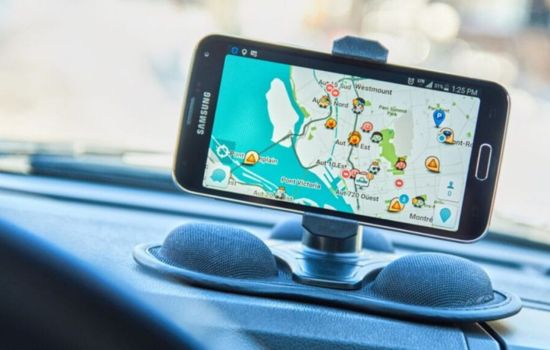
Waze stands out for its community-driven approach to navigation. Users actively report traffic incidents, police presence, road hazards, and gas prices, creating a dynamic, crowdsourced traffic information network. This real-time sharing makes Waze particularly effective at finding the fastest routes and avoiding unexpected delays.
The app’s social features extend beyond simple reporting. Users can see friends on the map, send arrival notifications, and even coordinate meet-ups. The gamification elements, including points and achievements for contributions, encourage active participation in the community.
Waze excels in urban environments where traffic patterns change rapidly. Its algorithm constantly recalculates routes based on fresh data from the user community, sometimes suggesting alternative routes mid-journey when faster options become available.
Google Maps: Comprehensive Navigation Solution
Google Maps offers arguably the most comprehensive mapping database globally, with detailed information about businesses, landmarks, public transportation, and even indoor maps for shopping centers and airports. The application seamlessly integrates navigation with search functionality.
Beyond basic driving directions, Google Maps provides navigation options for walking, cycling, public transit, and ride-sharing services. The transit directions include real-time departure schedules, platform information, and even crowdedness predictions for certain routes.
Google Maps’ Street View feature offers virtual exploration capabilities, allowing users to preview destinations and familiarize themselves with surroundings before arriving. This proves especially valuable when searching for parking or identifying building entrances in unfamiliar areas.

Apple Maps: The iOS Native Experience
Apple Maps has evolved significantly since its rocky launch, now offering a polished navigation experience deeply integrated with the iOS ecosystem. The app works seamlessly with Siri voice commands, Apple Watch, and CarPlay systems.
The application features detailed 3D city models for major metropolitan areas, providing visually rich navigation experiences. Flyover mode allows users to explore cities from aerial perspectives with photorealistic 3D models.
Privacy-conscious users appreciate Apple Maps’ approach to data handling. The app provides navigation services while minimizing personal data collection, using random identifiers rather than linking search queries and routes directly to user accounts.
Essential Features That Define Modern GPS Apps
Contemporary GPS applications have evolved beyond simple turn-by-turn directions, incorporating features that address various aspects of the navigation experience and travel planning process.
Real-Time Traffic Information 📊
Traffic data represents one of the most valuable features in modern GPS apps. Applications collect speed information from users’ devices, analyze traffic patterns, and identify congestion. This information helps apps suggest faster alternative routes and provide accurate arrival time estimates.
Advanced apps predict traffic conditions based on historical data, helping users plan departures around typical rush hour patterns. Some applications even send notifications suggesting earlier departure times when unusual traffic is detected on planned routes.
Offline Mapping Capabilities
Downloadable offline maps solve connectivity challenges in areas with poor cellular coverage or when traveling internationally without data plans. Users can download specific regions in advance and access navigation features without internet connection.
Offline functionality typically includes basic navigation, saved locations, and search capabilities within downloaded areas. While real-time traffic information requires connectivity, offline maps ensure basic navigation remains available regardless of connection status.
Multi-Stop Route Planning
Planning routes with multiple destinations has become standard in GPS applications. Users can add numerous stops, reorder them for efficiency, and receive navigation guidance through the entire sequence without manual intervention between destinations.
This feature proves invaluable for delivery drivers, sales representatives, tourists planning sightseeing itineraries, and anyone running multiple errands. Some apps optimize stop order automatically to minimize total travel time or distance.
How GPS Apps Impact Daily Commuting
Regular commuters have witnessed transformative changes in their daily travel experiences thanks to GPS applications. These tools have shifted from occasional navigation aids to constant companions that actively improve commute efficiency.
Morning routine planning now incorporates checking GPS apps for current traffic conditions and estimated commute times. Smart notifications alert users when they should leave to arrive on time, accounting for current traffic patterns rather than relying on static departure times.
The psychological benefits extend beyond time savings. Knowing the exact delay duration and having visual confirmation that the app is guiding you along the fastest available route reduces stress associated with sitting in traffic. The certainty replaces anxiety about whether alternative routes might be faster.
GPS apps have also influenced where people choose to live and work. Access to accurate commute time information helps individuals make informed decisions about housing locations, evaluating whether longer distances with better traffic flow might actually result in shorter commute times than geographically closer options with congestion issues.
GPS Navigation for Different Travel Modes 🚴
Modern GPS applications recognize that people navigate using various transportation methods, providing tailored experiences for each mode with relevant information and appropriate routing.
Driving Navigation
Driving mode remains the primary focus for most GPS apps, offering features like lane guidance for complex intersections, highway exit notifications, and speed limit information. Voice-guided directions allow drivers to keep eyes on the road while receiving navigation instructions.
Integration with vehicle systems through platforms like Android Auto and Apple CarPlay brings navigation information directly to dashboard displays. This integration provides safer, more convenient access to navigation features without handling phones while driving.
Walking Directions
Pedestrian navigation considers factors irrelevant to drivers, such as sidewalk availability, pedestrian crossings, and stairway locations. Walking directions often suggest routes through parks or pedestrian zones that provide more pleasant experiences than following roads.
GPS apps for walking typically display additional details about the surrounding area, including nearby businesses, public facilities, and transit options. The slower pace of walking allows users to explore contextual information that would be distracting while driving.
Public Transportation Integration
Transit directions combine route planning across multiple transportation modes, helping users navigate complex public transportation systems. Apps display bus and train schedules, platform information, and transfer instructions.
Real-time transit tracking shows actual vehicle locations and updated arrival predictions based on current service status rather than scheduled times. This information helps commuters make better decisions about when to leave and which routes to take when service disruptions occur.
Privacy and Data Considerations in GPS Apps
GPS applications necessarily collect location data to provide navigation services, raising important privacy considerations that users should understand when choosing and configuring these tools.
Most GPS apps store location history to provide personalized features like commute notifications, frequently visited places, and customized suggestions. This data reveals detailed patterns about users’ movements, daily routines, and personal habits.
Different apps take varying approaches to privacy protection. Some anonymize location data and avoid linking it directly to personal identifiers, while others use location information to enhance advertising targeting or share data with third parties for various purposes.
Users should review privacy settings and understand what data each app collects, how long it’s retained, and who else might access it. Most apps offer controls to limit data collection, delete location history, or prevent certain types of tracking while still providing basic navigation functionality. 🔒
Maximizing Battery Life While Using GPS Apps
GPS navigation is notoriously power-hungry, often draining smartphone batteries quickly during extended use. Understanding battery consumption and implementing strategies to manage power usage ensures navigation remains available throughout journeys.
The GPS receiver itself consumes significant power, but screen brightness often represents the largest battery drain during navigation. Reducing screen brightness to the minimum comfortable level substantially extends battery life without compromising functionality.
Many GPS apps offer battery-saving modes that reduce screen refresh rates, simplify graphics, or dim the display between navigation instructions. These modes sacrifice some visual polish for significantly improved battery endurance during long trips.
Car charging solutions provide the most reliable approach for extended navigation sessions. Inexpensive car chargers keep devices powered during drives, eliminating battery anxiety. For pedestrian navigation, portable battery packs offer similar peace of mind without vehicle power sources.
Future Developments in GPS Navigation Technology
GPS navigation continues evolving rapidly, with emerging technologies promising to enhance accuracy, functionality, and integration with other systems in ways that will further transform how we navigate our world.
Augmented Reality Navigation 📱
Augmented reality overlays navigation information directly onto camera views of the real world, making directions more intuitive by showing virtual arrows and indicators on actual streets and buildings. This technology helps users orient themselves more quickly and reduces confusion at complex intersections.
Early AR navigation implementations show promise for pedestrian directions, where users can hold phones up to see which direction to walk. As the technology matures, it may extend to driving applications through integration with windshield displays or specialized glasses.
Artificial Intelligence and Predictive Routing
Machine learning algorithms increasingly power route planning, analyzing vast datasets to predict traffic patterns with greater accuracy. AI systems learn individual user preferences and automatically customize routing suggestions based on personal patterns.
Future GPS apps may proactively suggest departures before users request directions, recognizing calendar appointments and predicting when navigation assistance will be needed. Intelligent systems could automatically reroute around predictable delays before users encounter them.
Enhanced Indoor Navigation
Indoor positioning systems supplement GPS in locations where satellite signals don’t penetrate, using Wi-Fi, Bluetooth beacons, and other technologies to provide navigation inside buildings. This capability will enable turn-by-turn directions through airports, shopping centers, hospitals, and office complexes.
As indoor mapping data expands and positioning technology improves, GPS apps will provide seamless transitions between outdoor and indoor navigation, guiding users from their parking spots through complex buildings to specific rooms or stores. 🏢
Choosing the Right GPS App for Your Needs
Selecting the optimal GPS application depends on individual priorities, travel patterns, and the specific features that matter most for your navigation requirements.
Frequent urban drivers who prioritize avoiding traffic might prefer community-based apps with active user reporting and aggressive rerouting. Those who value comprehensive business information and multi-modal directions might choose mapping services with extensive databases and transit integration.
Privacy-conscious users should investigate each app’s data practices and select options that align with personal comfort levels regarding location tracking and information sharing. Some users maintain multiple GPS apps, using different applications for different purposes based on their respective strengths.
Testing several popular GPS applications during typical travel scenarios helps identify which interface feels most intuitive, which routing algorithms align with personal preferences, and which feature sets provide the most value for individual needs.
Making the Most of Your GPS Navigation Experience
GPS applications have fundamentally changed how we explore and navigate the world, offering unprecedented access to accurate directions and real-time travel information. These tools continue evolving, incorporating new technologies and expanding capabilities that make navigation increasingly effortless.
The best GPS app for you depends on your specific needs, priorities, and preferences. Whether you value community features, comprehensive data, privacy protection, or seamless ecosystem integration, options exist to match virtually any requirement. Take time to explore different applications, customize settings to suit your preferences, and discover the features that enhance your navigation experiences most effectively.
As navigation technology advances, GPS apps will become even more integrated into daily life, anticipating needs and providing assistance before we even recognize we need it. Embracing these tools and understanding their capabilities ensures you’re always heading in the right direction. 🎯
