
# HTML Article: Google TV App
Google TV is revolutionizing how we discover and stream entertainment, bringing all your favorite content into one seamless, personalized platform.
In today’s fragmented streaming landscape, finding something to watch can feel like a chore. You hop between Netflix, Disney+, HBO Max, Prime Video, and countless other apps, struggling to remember which service hosts your favorite show. That’s where Google TV comes in, acting as your personal entertainment hub that aggregates content from multiple streaming platforms into one intuitive interface.
Whether you’re a casual viewer or a dedicated binge-watcher, the Google TV app transforms how you interact with digital entertainment. It learns your preferences, suggests personalized recommendations, and even lets you control your smart TV directly from your phone. Let’s dive deep into what makes this application an essential tool for modern streaming enthusiasts.
📱 What Exactly Is the Google TV App?
The Google TV app is Google’s comprehensive entertainment platform that consolidates streaming services, live TV, and purchased content into a single, user-friendly interface. Originally launched as Google Play Movies & TV, the service underwent a complete transformation to become the intelligent entertainment companion we know today.
Unlike traditional streaming apps that only show content from one provider, Google TV acts as an aggregator. It searches across multiple subscriptions simultaneously, displaying results from services like Netflix, YouTube, Disney+, Hulu, Peacock, Paramount+, and many others. This cross-platform functionality eliminates the frustration of hunting through individual apps.
The application is available on both Android and iOS devices, making it accessible regardless of your smartphone preference. Beyond just browsing content, it serves as a powerful remote control for compatible Google TV devices, Chromecast streaming dongles, and Android TV-powered smart televisions.
🎯 Personalized Recommendations That Actually Work
One of Google TV’s standout features is its sophisticated recommendation engine. Unlike generic “trending now” lists, the app analyzes your viewing habits, ratings, and preferences to curate content specifically for you.
When you first launch the app, you’ll be prompted to select your interests from categories like action, comedy, documentaries, sci-fi, and more. As you continue using the service, it refines these suggestions based on what you watch, search for, and add to your watchlist.
The “For You” tab becomes increasingly accurate over time, often surfacing hidden gems you might have overlooked. The algorithm considers factors like genre preferences, actors you frequently watch, directors you enjoy, and even the time of day you typically stream certain content types.
Google TV also provides contextual recommendations. If you’re watching a superhero series, it might suggest related films from the same cinematic universe or other shows featuring similar themes and characters. This interconnected approach helps you discover content that genuinely matches your tastes rather than simply promoting popular titles.

🔍 Universal Search Across All Your Streaming Services
Searching for specific movies or shows becomes effortless with Google TV’s universal search functionality. Instead of opening each streaming app individually to check availability, you can search once and see results from all connected services simultaneously.
Type in a movie title, and the app instantly displays where it’s available—whether it’s included with your existing subscriptions, available for rent or purchase, or streaming for free with ads. This transparency saves time and helps you make informed decisions about what to watch and where to watch it.
The search extends beyond titles to include actors, directors, and genres. Looking for everything starring your favorite actor? Google TV compiles a comprehensive list showing which services host their films and series. Interested in Oscar-winning documentaries? The app filters results accordingly, displaying availability across platforms.
📺 Transform Your Phone Into a Smart TV Remote
If you own a Google TV device, Chromecast with Google TV, or an Android TV, your smartphone becomes a powerful remote control through the app. This feature proves especially useful when you can’t find your physical remote or prefer typing with a keyboard rather than navigating letter-by-letter with directional buttons.
The remote functionality includes all standard controls: volume adjustment, playback controls, directional navigation, and a virtual touchpad for easier menu browsing. You can also use voice commands through your phone to search for content, control playback, or adjust settings on your television.
Typing search queries becomes significantly faster using your phone’s keyboard compared to the on-screen TV keyboard. Whether you’re entering login credentials for streaming services or searching for obscure film titles, the mobile keyboard streamlines the entire process.
The app automatically discovers compatible devices on your home network, making setup seamless. Once paired, you can switch between multiple Google TV devices throughout your home directly from the application.
🎬 Build and Manage Your Personal Watchlist
The watchlist feature acts as your personalized entertainment queue, allowing you to bookmark movies and shows you want to watch later. Unlike individual streaming service watchlists, Google TV’s watchlist is universal—adding content from different platforms into one consolidated list.
When browsing recommendations or search results, simply tap the bookmark icon to add titles to your watchlist. The app tracks where each item is available, notifying you if something becomes available on a service you subscribe to or if it’s leaving a platform soon.
Your watchlist syncs across devices, so items added on your phone appear when using the Google TV interface on your television. This cross-device synchronization ensures you always have access to your curated collection regardless of which screen you’re using.
The watchlist also serves as a discovery tool for families. Multiple household members can add content they’re interested in, creating a shared queue that helps everyone decide what to watch during family viewing time.
💡 Live TV Integration and Free Content Options
Beyond subscription streaming services, Google TV integrates live TV channels and free content platforms. If you have a YouTube TV subscription or access to live channels through other providers, these appear directly in the app alongside on-demand content.
The app also highlights free movies and shows available through ad-supported platforms like Pluto TV, Tubi, and YouTube’s free content library. This feature is particularly valuable for budget-conscious viewers who want to maximize entertainment without subscribing to multiple premium services.
Live sports, news, and events integrate seamlessly into the experience. The app can notify you when games involving your favorite teams are about to start, directing you to the appropriate streaming service or live TV channel.
Free content gets equal billing in search results and recommendations, ensuring you’re aware of no-cost viewing options before committing to rentals or additional subscriptions.
🛒 Rent, Buy, and Access Your Purchased Library
Google TV maintains the digital library functionality from its predecessor, Google Play Movies & TV. Any movies or television shows you’ve purchased through Google’s ecosystem remain accessible through the app.
When content isn’t available through your existing subscriptions, the app displays rental and purchase options with transparent pricing. Rentals typically offer 30 days to start watching and 48 hours to finish once you begin playback.
Purchased content downloads to your device for offline viewing, making it perfect for flights, road trips, or areas with limited internet connectivity. The download quality adjusts based on your storage preferences and device capabilities.
Your library syncs across all devices connected to your Google account, so purchases made on your phone are instantly accessible on your smart TV, tablet, or computer through compatible platforms.
🌟 Family-Friendly Features and Content Controls
For households with children, Google TV offers robust parental controls and family-friendly content curation. You can create profiles for different family members, each with age-appropriate content restrictions and personalized recommendations.
The kids’ profile filters search results and recommendations to show only content rated appropriate for younger viewers. This prevents accidental exposure to mature themes while allowing children to independently browse and select entertainment.
Parents can set viewing time limits, restrict purchases, and monitor what their children are watching through activity reports. These controls provide peace of mind without requiring constant supervision.
Family watchlists can be shared or kept separate, giving everyone their own space while maintaining options for communal viewing selections.
🔔 Notifications and Personalized Alerts
The app keeps you informed about entertainment relevant to your interests. You’ll receive notifications when new seasons of shows on your watchlist premiere, when movies you’ve been anticipating become available, or when content is about to leave your streaming services.
Price drop alerts notify you when movies you’ve wishlisted go on sale, helping you save money on digital purchases. These notifications are customizable, so you control the frequency and types of alerts you receive.
For live content like sports events or premieres, reminders ensure you don’t miss what matters most. The app can send notifications shortly before events begin, giving you time to settle in for viewing.
🎨 User Interface and Design Philosophy
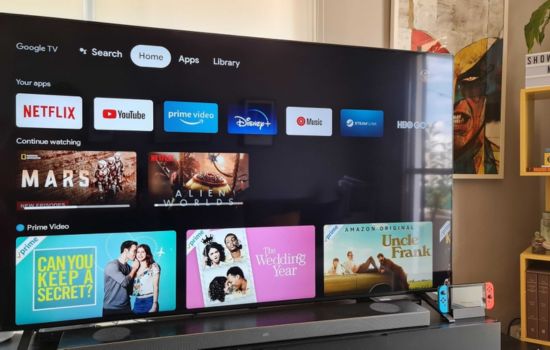
Google TV’s interface prioritizes simplicity and visual appeal. The home screen features vibrant artwork from movies and shows, creating an immersive browsing experience that feels more like exploring entertainment than navigating software.
Content is organized into intuitive categories: For You, Movies, Shows, Apps, and Library. Each section loads quickly and responds smoothly to navigation, even on older smartphone hardware.
The design adapts to both light and dark environments, automatically adjusting based on your device settings or time of day. This attention to visual comfort makes extended browsing sessions more pleasant.
Accessibility features include closed captioning options, audio descriptions where available, and compatibility with screen readers for visually impaired users.
🔗 Streaming Service Integration and Compatibility
Google TV works with dozens of streaming platforms, though the exact selection varies by region. Major services like Netflix, Disney+, HBO Max, Amazon Prime Video, Paramount+, Peacock, Apple TV+, and YouTube integrate seamlessly.
Some streaming services offer deeper integration than others. For fully integrated platforms, you can start watching content directly through Google TV without opening the separate app. For others, selecting a title redirects you to the appropriate streaming application.
The app doesn’t require subscriptions to function—it works perfectly well as a content discovery tool and remote control even if you only use free streaming services or rely on purchases and rentals.
New streaming platforms regularly join the ecosystem, expanding your options and ensuring the app remains current with evolving entertainment landscapes.
📊 Performance and Technical Requirements
The Google TV app runs smoothly on modern smartphones and tablets. Android users need version 5.0 or higher, while iOS users require iOS 13.0 or later. The app receives regular updates that introduce new features, improve performance, and expand streaming service compatibility.
Internet connectivity is required for streaming and most browsing functions, though downloaded content remains accessible offline. A stable Wi-Fi connection provides the best experience, particularly when streaming high-definition or 4K content to your television via casting.
The app consumes minimal storage space on your device, typically under 100MB for the application itself, with additional space needed only for downloaded content you choose to store locally.
Battery usage remains reasonable during typical browsing, though extended casting sessions or video playback on your phone will naturally drain power faster.
🚀 Getting Started with Google TV
Setting up the Google TV app takes just minutes. After downloading from your device’s app store, sign in with your Google account to sync your preferences, purchases, and watchlist across devices.
The initial setup guides you through selecting favorite genres, connecting streaming services, and discovering compatible devices on your network. You can skip these steps and return to them later if you prefer to explore the app first.
Linking streaming accounts happens directly within the app for most services, or you may be redirected to log in through the service’s website for security. Once connected, the app can search and display content from those platforms.
If you own compatible Google TV hardware, the app automatically detects devices when they’re on the same Wi-Fi network, enabling remote control functionality without complicated pairing procedures.
✨ Why Google TV Stands Out in the Crowded Streaming Market
What distinguishes Google TV from competitors is its genuinely platform-agnostic approach. Rather than promoting exclusive content or pushing specific services, it focuses on helping you find what you want to watch, wherever it might be available.
The personalization engine learns quickly and accurately, offering recommendations that feel thoughtful rather than algorithmic. Combined with universal search and seamless device integration, the app eliminates friction from the entertainment discovery process.
For anyone overwhelmed by subscription fatigue or frustrated by fragmented streaming experiences, Google TV provides a centralized solution that respects your time and preferences. It’s not just another streaming app—it’s the command center for all your streaming apps.
Whether you’re settling in for a movie night, quickly checking where a show is available, or controlling your TV from across the room, the Google TV app delivers practical value that enhances your entire entertainment ecosystem. In a world where content is abundant but discovery is challenging, having a smart guide makes all the difference. 🎉
