
Remote control apps have revolutionized how we interact with our home entertainment systems, offering unprecedented convenience through our smartphones and tablets.
Gone are the days of searching frantically between couch cushions for that elusive TV remote. Modern technology has gifted us with smart solutions that transform our mobile devices into powerful universal controllers. Whether you’re managing your television, air conditioner, sound system, or streaming devices, remote control apps bring everything together in one accessible place.
The beauty of these applications lies in their versatility and ease of use. They eliminate the clutter of multiple remotes while offering features that traditional controllers simply cannot match. From voice commands to personalized button layouts, these apps represent the future of home device management. 📱
Why Remote Control Apps Are Taking Over 🚀
The shift toward smartphone-based remote controls isn’t just a trend—it’s a fundamental change in how we interact with technology. Our phones are always within arm’s reach, making them the perfect substitute for traditional remotes that seem to disappear at the worst possible moments.
Remote control apps leverage infrared (IR) blasters or Wi-Fi connectivity to communicate with your devices. Many modern smartphones come equipped with IR sensors, while others rely on your home’s wireless network to send commands. This dual approach ensures compatibility with both older and newer appliances.
The convenience factor extends beyond simple replacement. These apps often include features like macro commands that perform multiple actions with a single tap, customizable interfaces that adapt to your preferences, and cloud backup options that preserve your settings across devices.
Universal Compatibility Across Devices
One of the most compelling advantages of remote control applications is their ability to work with numerous brands and device types. Unlike proprietary remotes limited to specific manufacturers, these apps support thousands of models from various companies.
Smart TVs from Samsung, LG, Sony, and Panasonic all respond to these universal controllers. The same applies to streaming devices like Roku, Apple TV, Chromecast, and Fire TV Stick. You can even control air conditioners, DVD players, projectors, and audio receivers through a single application.
The setup process typically involves selecting your device brand and model from an extensive database. The app then configures itself automatically, loading the appropriate command set. This intelligent matching system ensures reliable performance without complex programming.
Key Features That Make These Apps Essential ✨
Modern remote control applications go far beyond basic channel changing and volume adjustment. They incorporate sophisticated features designed to enhance your entire entertainment experience.
Voice Control Integration
Speaking commands to your TV might have seemed like science fiction a decade ago, but it’s now standard functionality. Voice control allows you to search for content, switch inputs, adjust settings, and launch apps without touching your phone screen.
This hands-free operation proves particularly useful when you’re cooking, exercising, or simply relaxing. The speech recognition technology has improved dramatically, understanding natural language and context better than ever before.
Personalized Button Layouts
Everyone uses their remote differently. Some people primarily stream content, while others switch between cable channels. Remote control apps recognize this diversity by allowing complete customization of button placement and function.
You can create dedicated profiles for different family members, each with their preferred layout. Children might have a simplified interface with only essential controls, while tech enthusiasts can access advanced settings and shortcuts.
Smart Home Integration
The lines between entertainment systems and smart home ecosystems continue to blur. Leading remote control apps now integrate with platforms like Google Home, Amazon Alexa, and Apple HomeKit, enabling coordinated control of lights, thermostats, and media devices.
Imagine dimming the lights, closing the blinds, and starting your movie with a single tap. These contextual scenes create immersive experiences that traditional remotes could never deliver.
Setting Up Your Remote Control App 🔧
Getting started with a remote control application is surprisingly straightforward, even for those who don’t consider themselves particularly tech-savvy. The process typically takes just a few minutes from download to full functionality.
First, ensure your smartphone has either an infrared blaster or connects to the same Wi-Fi network as your devices. Most apps will automatically detect compatible devices on your network during the initial setup wizard.
For IR-based connections, you’ll position your phone toward the device and test various command signals until the app identifies the correct protocol. The guided setup makes this process intuitive, with clear visual instructions at each step.
Troubleshooting Common Connection Issues
Occasionally, you might encounter connectivity challenges. The most common issue involves Wi-Fi network configuration, particularly if you have separate 2.4GHz and 5GHz bands. Many older smart TVs only support 2.4GHz connections, so ensure your phone connects to the appropriate network during setup.
If infrared commands aren’t working, check for physical obstructions between your phone and the device. IR signals require line-of-sight transmission, unlike Wi-Fi which works through walls. Also, verify that your phone’s IR blaster isn’t blocked by a case or screen protector.
Maximizing Battery Life While Using Remote Apps 🔋
A legitimate concern with remote control applications involves battery consumption. Running these apps continuously, especially with Wi-Fi or Bluetooth connections active, can drain your phone’s power more quickly than typical usage.
However, developers have implemented several optimization strategies to minimize battery impact. Most apps enter a low-power mode when not actively sending commands, reducing background processes to essential functions only.
You can further extend battery life by adjusting certain settings. Reducing screen brightness while using the app, disabling unnecessary notifications, and closing other background applications all contribute to more efficient power management.
Security Considerations for Remote Control Apps 🔒
As with any application that connects to your home network, security should remain a priority. Remote control apps access your Wi-Fi network and communicate with various devices, creating potential vulnerabilities if not properly secured.
Choose applications from reputable developers with strong privacy policies and regular security updates. Read user reviews to identify any reported issues regarding unauthorized access or data collection practices.
Implementing network-level security measures provides additional protection. Use strong, unique passwords for your Wi-Fi network, enable WPA3 encryption if available, and consider creating a separate guest network for IoT devices including smart TVs and streaming boxes.
Permissions and Privacy
Pay attention to the permissions requested during app installation. A legitimate remote control application needs access to Wi-Fi information and possibly location services for device discovery, but shouldn’t require access to contacts, messages, or other unrelated data.
Review the app’s privacy policy to understand what information gets collected and how it’s used. Quality applications minimize data collection and never sell user information to third parties.
Advanced Features for Power Users 💪
Once you’ve mastered the basics, remote control apps reveal layers of advanced functionality that transform them from simple replacements into powerful automation tools.
Macro Commands and Automation
Macros allow you to chain multiple commands into a single action. For example, you might create a “Movie Night” macro that turns on your TV, switches to the correct HDMI input, launches your streaming app, adjusts the volume to your preferred level, and even signals your smart lights to dim—all executed with one tap.
These automated sequences save time and ensure consistency. You won’t forget any steps in your setup routine because the app handles everything automatically.
Gesture Controls
Some premium remote control applications support gesture-based commands. Swiping patterns on your phone screen trigger specific actions, creating an intuitive interface that feels natural and modern.
A quick swipe up might increase volume, while swiping right could change channels. These gesture controls become second nature with practice, making device operation even faster than traditional button pressing.
Scheduling and Timer Functions
Advanced scheduling capabilities enable your devices to turn on or off at predetermined times. Set your TV to automatically power on for the morning news or turn off after you’ve fallen asleep, eliminating wasted energy and enhancing convenience.
Some apps integrate with sleep tracking or presence detection, adapting their behavior based on whether you’re home or away. This intelligent automation represents the true potential of smart home technology.
Comparing Top Remote Control Apps 📊
The app marketplace offers numerous remote control solutions, each with distinct strengths and specializations. Understanding these differences helps you choose the perfect application for your specific needs.
Some apps focus on broad device compatibility, supporting thousands of models across hundreds of brands. Others specialize in premium features like advanced customization, cloud synchronization, or integration with specific smart home platforms.
User interface design varies significantly between applications. Some prioritize simplicity with minimalist layouts perfect for quick commands, while others embrace feature-rich interfaces that display extensive information and options.
Free vs. Premium Versions
Many remote control apps operate on a freemium model, offering basic functionality at no cost while reserving advanced features for paid subscriptions. Free versions typically include standard remote functions with occasional advertisements.
Premium subscriptions remove ads and unlock features like unlimited custom remotes, advanced macro programming, cloud backup, and priority customer support. Consider whether these enhancements justify the subscription cost based on your usage patterns.
The Future of Remote Control Technology 🔮
Remote control apps continue evolving rapidly, incorporating emerging technologies and responding to changing user expectations. Artificial intelligence and machine learning are beginning to play larger roles in these applications.
Predictive interfaces learn your viewing habits and anticipate commands before you issue them. If you always watch a particular show on Tuesday evenings, your app might automatically suggest launching that streaming service when you pick up your phone at the appropriate time.
Augmented reality features are entering development, potentially allowing you to point your phone’s camera at a device to instantly control it without manual configuration. This visual identification system would eliminate setup complexity entirely.
Integration with Wearable Devices
Smartwatch compatibility represents another frontier for remote control functionality. Quick commands from your wrist offer even greater convenience than pulling out your phone, perfect for adjusting volume or pausing content without interrupting other activities.
As wearable technology improves, we’ll likely see more sophisticated remote control implementations that leverage unique capabilities like haptic feedback and always-on displays.
Making the Switch from Traditional Remotes 🎯
Transitioning from physical remotes to smartphone-based control requires minimal adjustment for most users. The intuitive nature of touchscreen interfaces means family members of all ages can adapt quickly.
Start by using the app alongside your traditional remote, gradually becoming comfortable with the digital interface. Once you’ve memorized button locations and appreciated the added features, you’ll naturally reach for your phone first.
Keep one physical remote as a backup, particularly if multiple people share the television. Not everyone may have the app installed, and having a traditional option ensures universal access.
Training Other Household Members
Introducing new technology to your household works best with patience and clear demonstrations. Show family members the basic functions they’ll use most frequently, avoiding overwhelming them with advanced features initially.
Create simple reference guides if needed, perhaps screenshots showing the most common commands. Most people will discover additional features naturally once they’re comfortable with fundamentals.
Troubleshooting and Support Resources 🛠️
Even the best applications occasionally encounter issues. Knowing where to find help and how to resolve common problems ensures minimal disruption to your entertainment.
Most quality remote control apps include comprehensive in-app help sections with FAQs, troubleshooting guides, and tutorial videos. These resources address the majority of user questions without requiring external support.
Developer websites typically maintain updated compatibility lists, known issue trackers, and community forums where users share solutions and tips. These communities often provide faster assistance than formal support channels.


For persistent technical problems, contact the developer’s support team directly through email or in-app messaging. Provide specific details about your device models, app version, and the exact nature of the problem to expedite resolution.

Environmental and Practical Benefits 🌍
Beyond convenience, remote control apps contribute to environmental sustainability by reducing electronic waste. Physical remotes require batteries that eventually need disposal, and broken remotes add to landfill accumulation.
Manufacturing traditional remotes consumes resources and energy, from plastic production to packaging and shipping. Digital alternatives eliminate these material requirements entirely, representing a small but meaningful step toward more sustainable technology consumption.
The space-saving aspect shouldn’t be overlooked either. Eliminating multiple remotes declutters your living space, creating a cleaner, more organized environment that many people find psychologically satisfying.
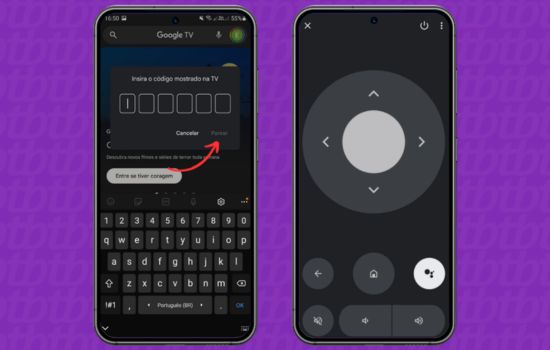
Enhancing Your Entertainment Experience 🎬
Remote control apps aren’t merely functional tools—they actively improve how you enjoy entertainment. The enhanced control and customization options create more engaging, personalized viewing experiences.
Quick access to streaming services means less time navigating menus and more time watching content. Customizable shortcuts bring your favorite channels or apps to the forefront, eliminating repetitive navigation sequences.
For families, individual profiles ensure everyone can optimize their experience without affecting others. Children, parents, and guests can each have tailored interfaces matching their preferences and technical comfort levels.
The integration of additional information enhances decision-making. Some apps display program guides, content ratings, and viewing recommendations directly within the remote interface, helping you discover new entertainment without switching between applications.
Remote control apps represent far more than simple digital replacements for physical remotes. They embody the convergence of entertainment technology, smart home automation, and mobile computing. As these applications continue advancing, they’ll unlock new possibilities we haven’t yet imagined, making our interactions with technology increasingly seamless and intuitive. Whether you’re a tech enthusiast seeking maximum customization or someone who simply wants a reliable remote that never gets lost, these applications deliver tremendous value with minimal learning curve. 🌟
